Modeling checks
What each modeling check means and how to fix it.
The app checks your diagram against BPMN rules and common style guidance every time it changes. The checks are based on Method & Style conventions: every path should start and end, decisions should be labeled, and splits and merges should be explicit.
This page covers BPMN processes. Sequence diagrams have checks of their own: see Check your diagram.
Where checks show up
- The Problems panel under the diagram lists every issue: mistakes first (a mistake in the Flowmark text, then errors, then warnings), then what's left to finish, then style notes, each marked with its own icon. Select an issue to select the element it's about on the canvas, or, for a Flowmark mistake, to jump to its line.
- The status bar at the bottom of the editor counts problems and what's left to finish apart, as in "1 problem · 3 to finish". Problems turn it amber; work left to finish doesn't. Style notes aren't counted. With nothing left, it says "No problems". Selecting it shows or hides the Problems panel, and so does ⌘ J (Ctrl J on Windows and Linux).
- Steps with a mistake are marked on the canvas: red for an error, amber for a warning. A step that isn't finished gets a small dashed grey dot instead.
- In Flowmark, a mistake on the line you're typing waits until you leave the line or pause for a moment. A fix clears it at once.
- When there are errors or warnings, Fix with assistant in the panel's header opens the assistant with a request to fix them already typed in. Read it over and send it.
The assistant gets the same list after every change it makes and fixes what it can before it finishes.
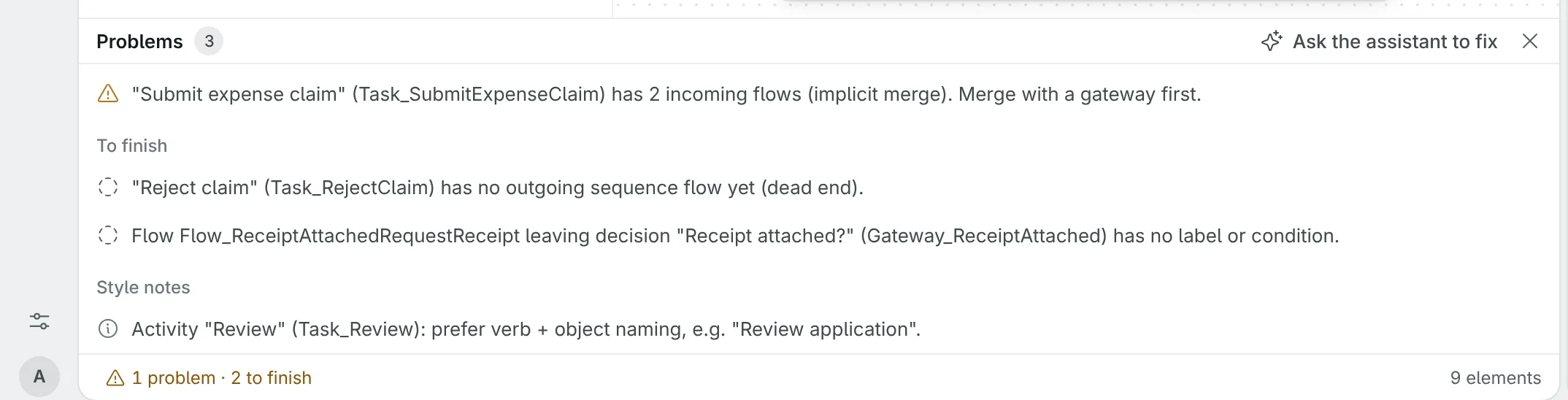
Errors are mistakes that break the process: a path that can't finish, or a gateway that would wait forever. Warnings are things that work but make the diagram ambiguous or harder to read. Style notes are suggestions; it's fine to leave some.
Work left to finish
Some checks only mean the diagram isn't done yet, so they're listed under To finish rather than as problems:
- the process has no start event, or no end event, yet;
- a step isn't connected yet, has no incoming sequence flow yet, or has no outgoing sequence flow yet;
- an activity has no name;
- a timer has no duration, date or cycle;
- a gateway neither splits nor merges yet;
- a flow leaving a decision has no label or condition.
A step you've just added stays unmarked while you work on it. Once you select something else, a step that isn't finished gets a small dashed grey dot, which goes away when you finish it. The assistant still sees these checks as errors and warnings, so it finishes its own loose ends before it hands a diagram back.
In this page, an activity is any task, call activity or sub-process.
Errors
The process has no start event
Every process needs at least one start event to show where it begins. Add one, or turn the first step into a start event.
The process has no end event
Every process needs at least one end event to show where it finishes. Add an end event at the end of each path. Separate end events for different outcomes, such as "Order placed" and "Request rejected", read best.
Isn't connected yet
The element has no arrow arriving and none leaving, as when you've just added it on its own. Connect the step before it and the step after it, or delete it if it's left over. This is work left to finish.
Has no outgoing sequence flow yet (dead end)
The element has no arrow leaving it, so the path stops without finishing. Connect it to the next step, or add an end event after it. End events are the only elements allowed to have no outgoing flow. This is work left to finish.
Has no incoming sequence flow yet
The element has no arrow arriving, so nothing ever starts it. Connect the step before it. Start events and boundary events don't need incoming flows. This is work left to finish.
Cannot be reached from a start event
Arrows lead into the element, but none of them come from a start event: it sits in a loop that nothing leads into. Lead a path from the process into the loop, or delete it if it's left over. Steps cut off only because a step before them isn't connected yet aren't reported; the check names that step instead.
Never leads to an end event
The element can be reached, but every path from it loops back without reaching an end event, so the process could get stuck there. Give the loop a way out to an end event. Steps cut off only because a step after them has no outgoing flow yet aren't reported; the check names that step instead.
Boundary event isn't attached to an activity
A boundary event (a timer, error or message on a task's border) must sit on an activity. This shows up when it's attached to nothing or to something that isn't an activity, such as a gateway. Delete it and attach a new one to the right task.
Event-based gateway must lead to catch events or receive tasks
An event-based gateway waits for whichever event happens first, so each path out of it has to start with something that waits: an intermediate catch event (a timer or message) or a receive task. Change the step after the gateway to one of those, or use a decision gateway instead.
Joins branches of an exclusive split (deadlock)
A parallel gateway that merges paths waits for all of them to arrive. If those paths came from a decision gateway, only one of them is ever taken, so the parallel gateway waits forever. Change the merging gateway to an exclusive (XOR) gateway.
A decision's branches meet at a parallel gateway (deadlock)
The same deadlock happens when a decision sits inside parallel work, such as a fraud check on one of two parallel paths, and its branches go straight into the parallel join. The join waits for each of them, but only one is taken. Merge the decision's branches with an exclusive (XOR) gateway first, and lead that one flow into the parallel gateway. See Parallel work.
A loop comes back into one branch of a parallel join (deadlock)
A path after a parallel join, such as a dispute that sends a claim back for reassessment, loops back into only one of the branches the join waits for. On the next pass that branch arrives again, but the others don't run again, so the join waits forever. Bring the loop back to a merge after the join, or to before the parallel split so every branch runs again.
A message connects two steps of this process
Messages go between your process and an outside pool. Between two steps of the process, use a sequence flow instead.
A message connects two outside pools
One end of a message has to be a step of your process. The app doesn't model what outside pools say to each other.
A step can't send or receive this message
Gateways and boundary events can't send or receive messages, and an event can only go one way: start and catch events receive, throw and end events send. An event with another type, such as a timer, has to become a message event first. Move the message to a task or a message event, or change the step's type.
Warnings
Activity has no name
Unnamed activities make the diagram hard to read. Name it as a verb and an object, such as "Approve invoice".
Activity or event has several incoming flows (implicit merge)
Two or more arrows go straight into an activity, or into an intermediate event such as a message a loop waits for again. In BPMN this can start it more than once. Merge the paths with a gateway in front of it: exclusive (XOR) when only one of them is taken, parallel (AND) when they all run.
Activity or event has several outgoing flows (implicit split)
Two or more arrows leave an activity or an intermediate event directly, which leaves unclear whether one path is taken or all of them. Add a gateway after it: exclusive (XOR) to choose one path, parallel (AND) to take all of them.
Timer has no duration, date or cycle
A timer event needs a value saying when it fires. Set one in Flowmark as an ISO 8601 duration such as P2D (two days) or PT4H (four hours). Timers added from the canvas start at one day (P1D).
Gateway neither splits nor merges yet
The gateway has at most one way in and one way out, so it does nothing yet. Add its branches, or delete it.
Flow leaving a decision has no label or condition
When a decision gateway splits the path, each outgoing arrow should say when it's taken. Label each arrow with an answer to the gateway's question, such as "yes" and "no", or make one of them the default flow.
Flow leaving a parallel gateway has a condition
A parallel gateway takes every outgoing path, so a condition on one of them is ignored. Remove the condition, or use an exclusive or inclusive gateway if the path is meant to be optional.
Exclusive gateway merges branches from a parallel split
The paths came from a parallel split, so they all run, and an exclusive gateway lets each of them through on its own. Everything after it then happens more than once. Join the paths with a parallel (AND) gateway.
Branches of a parallel split never meet again
Every path out of a parallel split runs, and the process finishes only when each one has reached an end. A branch that only waits, such as a timer beside the work for a deadline, keeps the case open and still fires after the work is done. Join the branches with a parallel (AND) gateway. For a reminder or deadline over the work, put a timer on the activity that keeps the work open instead. See Deadlines and reminders.
Several elements have the same name
Two or more elements share a name, so they read as the same thing and are ambiguous when you or the assistant refer to them by name. Give each one a distinct name. Boundary events are left out of this check.
The diagram has more than 20 activities
A diagram reads best at one level of detail, around 5 to 20 activities. Move a detailed area into a call activity or a sub-process, and model that part as its own diagram.
Style notes
Activity name is a single word
Activity names read best as a verb and an object, such as "Review application" rather than "Review".
Start or end event has no name
Name events as a state, such as "Order received" or "Invoice paid".
Decision gateway has no name
Phrase a decision gateway's name as a question, such as "Amount over 10k?", so its outgoing arrows read as answers.
Gateway both merges and splits
One gateway joins paths and then splits them again. It's valid, but a separate merge gateway followed by a split gateway is easier to follow.
Message event has no message to or from an outside pool
A message event says something passes between your process and another party. A message throw or end event with nothing going to a pool, or a message start or catch event with nothing coming from one, leaves out who that is. Add the message, or change the event's type. These notes only appear once the diagram has outside pools.
Step names a pool but sends or receives no message
A send or receive task whose name mentions an outside pool, such as "Send invoice to Customer" with a Customer pool, most likely talks to that pool. Add the message. Send and receive tasks that don't name a pool aren't noted, because they often notify someone inside the process.
Pool has no messages
An outside pool is there to show what passes between it and your process. Add a message to or from it, or remove it.
Lane is empty
The lane has no steps in it. Move steps into it, or delete it.
The diagram is empty
The diagram has no elements yet. See Start from an empty canvas.
Elements the app can't show
Pools and messages import fine. When you import a .bpmn file with things the app doesn't model, such as nested lanes, sub-process contents, groups, data objects or steps inside another pool, the app names them as it imports: "The canvas can't show …, so they weren't imported." The diagram keeps everything else and is laid out again, so its BPMN download is the app's own layout, not the original file's.